Back-up Email Accounts before a domain transfer.
Note: This is a variant to the Outlook PST manual migration for those migrating from a Mac-based OS.
If you are transferring from a cPanel based provider, send a mail to support@registerdomain.co.za and we will investigate a possible server-side migration for you.
If you do not meet the above indication, the steps are as follows (*Use at your own discretion):
Step 1 - Backup
1.1) Locate the Mailbox you want to backup
1.2) Right-click the mailbox in question and select "Export Mailbox"

1.3) Save the back-up created
Step 2 - Create the email account
References Create the account
Step 3 - Configure domain
References Configure domain
Step 4 - Import
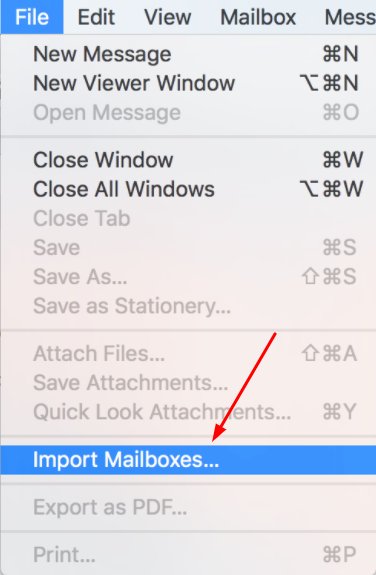
4.1) Click on the File tab and choose "Import Mailboxes"
4.2) Choose your "From data type" as "Apple Mail" and select "Continue"
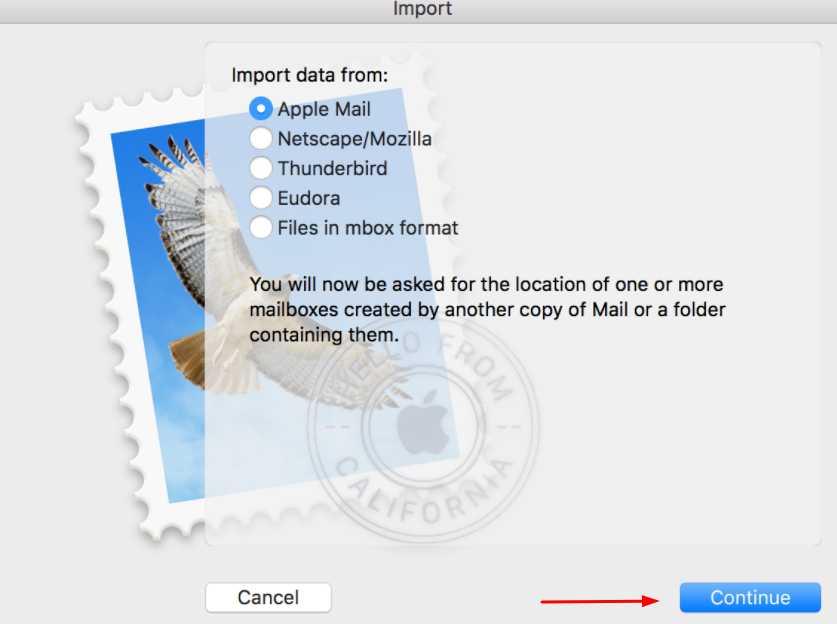
4.3) Now click on the file in question and select "Choose"

4.4) The backup will now appear under "Import"
4.5) Lastly drag the files to the mailbox in question and complete the import