Cape Town: (021) 200-1480    |    Johannesburg: (010) 590-3333

Register Domain SA
  • 0 Shopping Cart
  •  
  • Domains
    •     Domain Registration
    •     Domain Transfer
    •     Domain Pricing
    •     Domain Reseller
  • WordPress
  • Hosting
    •     Web Hosting
    •      LiteSpeed Hosting
    •     Email Hosting
    •     Enterprise Hosting
    • ----------------------------------------
    •     Managed Server
    •     Self-Managed Server
  • Website Builder
  • SSL Certificates
  •   Help
    •     Open Support Ticket
    •     Announcements
    •     Knowledge Base
    •     Network Status
  • More
  •   My Account
    • Login
    • Forgot Password?

Categories

Account Management
4
Backup & Restore
2
DNS Management
3
Domain Names
15
Email Support
23
FAQs
8
Manual Migration
12
Plesk
2
Policies and Usage
1
Sales & Accounts
2
SSL Certificates
1
Support
3
Video Tutorials
1
Web Hosting
6
WordPress
1

  Categories

Tag Cloud

blacklist spam report spam spam messages block sender whitelist sender whitelist message not spam message reported as spam whitelist spam za.com za.com registrations za.com renewal za.com price nameservers not updating nameservers not updating cannot change nameservers disk space file count zar domain domains domain name account management

Step 6 - Connecting the database Print

  • 3

6.1.) Locate your database
- Navigate to your Public_html folder and locate the wp-config file
- Right-click and select Edit
- You are now viewing the Database data
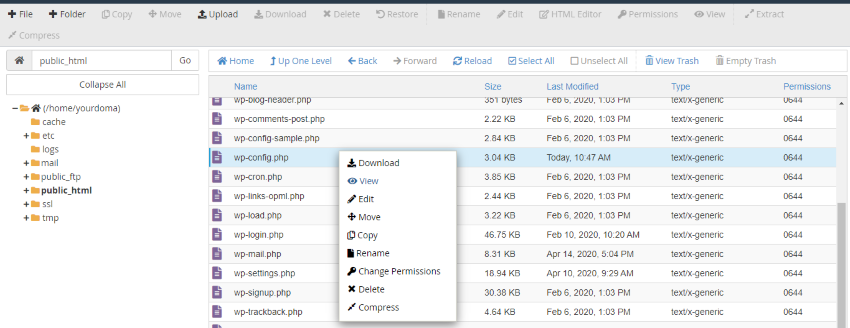
6.2.) Insert the new username, database name and password
- Remove the Database details (Example - yourdoma_wp103) and replace with the database  information created in Step 3


Was this answer helpful?

Related Articles

Step 1 - Export website files Kindly note that the below tutorial is based on a cPanel platform and may differ slightly for... Step 2 - Export Database You will need to know which database reference the website see Step 6.1: Locate Database 2.1.)... Step 5 - Import Database 5.1) Navigate to "phpMyAdmin" 5.2.) Select the database created in Step 3 - Now we will need... Step 3 - Create new database 3.1) Navigate to "MySQL Database" 3.2.) Create a new Database: - Enter the new Database Name,... Step 4 - Import Website Data 1. Delete existing website data - Remember to backup old data first.- In the File Manager under...
« Back

Tag Cloud

blacklist spam report spam spam messages block sender whitelist sender whitelist message not spam message reported as spam whitelist spam za.com za.com registrations za.com renewal za.com price nameservers not updating nameservers not updating cannot change nameservers disk space file count zar domain domains domain name account management

Domain Names


  • Domain Registration
  • Domain Transfer
  • Domain Reseller
  • Domain Pricing

Products & Services


  • Web Hosting
  • Email Hosting
  • WordPress Hosting
  • Website Builder
  • LiteSpeed Hosting
  • Enterprise Hosting
  • Managed Server
  • Self-Managed Server
  • SSL Certificates

Customer Support


  • Network Status
  • Announcements
  • Knowledge Base
  • Open Support Ticket

Company


  • About Us
  • Contact Us
  • Blog

Legal


  • Terms Of Service
  • Domain Disputes
  • AU Policy
  • Privacy Policy
  • Email Disclaimer
  • POPI Statement
Payment gateway logo
ISPA logo

Copyright © 2025 Register Domain SA. All Rights Reserved.

Loading...
Loading...

Choose Currency

R ZAR
$ USD

Generate Password

Please enter a number between 8 and 64 for the password length